You cannot select more than 25 topics
Topics must start with a letter or number, can include dashes ('-') and can be up to 35 characters long.
4.4 KiB
4.4 KiB
NUSMoney Frontend
- Create react project
npx create-react-app nusmoney - Replace
App.js, App.css,brand-logo.pngreference code
-
App.js
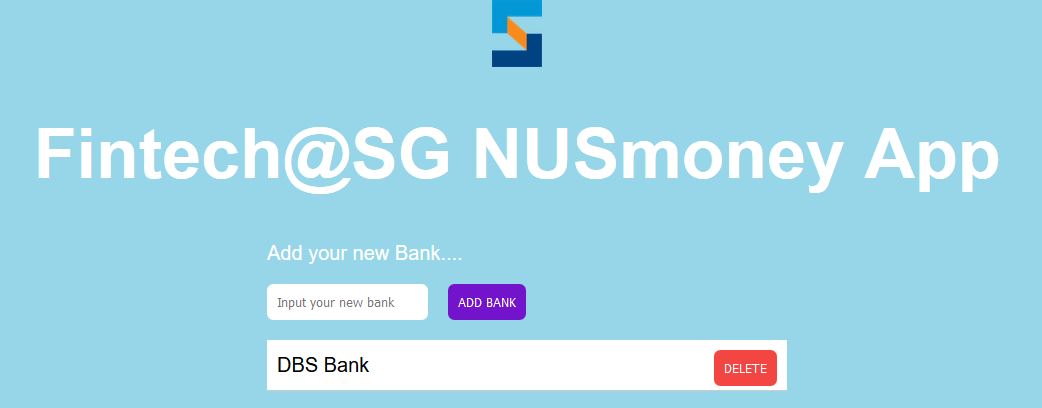
import React from "react"; import logo from "./brand-logo.png" import "./App.css"; class App extends React.Component { constructor(props) { super(props); this.state = { newBank: "", bankList: [] }; } addBank(bankName) { if (bankName !== "") { const newBank = { id: Date.now(), value: bankName, isDone: false }; const bankList = [...this.state.bankList]; //get the Banklist from state bankList.push(newBank); //add new back to the list this.setState({ //update the state bankList, newBank: "" }); } } deleteItem(id) { const bankList = [...this.state.bankList]; //const updatedbankList = bankList.filter(item => item.id !== id); const updatedbankList = bankList.filter(function(item){return item.id !== id}); this.setState({ bankList: updatedbankList }); } updateInput(input) { this.setState({ newBank: input }); } render() { return ( <div> <img src={logo} width="50" alt="brand logo" className="logo" /> <h1 className="app-title">Fintech@SG NUSmoney App</h1> <div className="container"> Add your new Bank.... <br /> <input type="text" className="input-text" placeholder="Input your new bank" required value={this.state.newBank} onChange={e => this.updateInput(e.target.value)} /> <button className="add-btn" onClick={() => this.addBank(this.state.newBank)} disabled={!this.state.newBank.length} > Add Bank </button> <div className="list"> <ul> {this.state.bankList.map( (item) => { return ( <li key={item.id}> {item.value} <button className="btn" onClick={() => this.deleteItem(item.id)} > Delete </button> </li> ) } )} <li> DBS Bank <button className="btn">Delete</button> </li> </ul> </div> </div> </div> ); } } export default App; -
App.css
body {
background: #97d5e8;
font-family: "Montserrat", sans-serif;
font-size: 20px;
}

.logo {
display: block;
margin-left: auto;
margin-right: auto;
}

.input-text {
display: inline;
margin: 0;
border: none;
border-radius: 0.4rem;
padding: 10px;
}

.list ul li button {
position: absolute;
right: 0%;
background: #f34541;
color: #fff !important;
text-transform: uppercase;
text-decoration: none;
margin-left: 10px;
margin-right: 10px;
padding: 10px;
border-radius: 0.4rem;
display: inline-block;
border: none;
}

.add-btn {
color: #fff !important;
text-transform: uppercase;
text-decoration: none;
background: #7313cb;
margin: 20px;
padding: 10px;
border-radius: 0.4rem;
display: inline-block;
border: none;
}

.app-title {
text-align: center;
color: #fff;
font-size: 70px;
}
ul {
/* remove default padding and margin from ul*/
margin: 0px;
padding: 0px;
}
.list ul li {
display: block;
width: 100%;
text-decoration: none;
color: #000000;
background-color: #ffffff;
line-height: 30px;
border-bottom-style: solid;
border-bottom-width: 1px;
border-bottom-color: #cccccc;
padding: 10px;
position: relative;
}

.container {
color: #fff;
max-width: 500px;
margin: auto;
}
- Navigate to nusmoney. Start the server
npm start - Navigate browser to http://localhost:3000
- The page should display