You cannot select more than 25 topics
Topics must start with a letter or number, can include dashes ('-') and can be up to 35 characters long.
1.7 KiB
1.7 KiB
Interfacing ST7789 LCD using SPI
Technical Specifications
- Display
- Resolution: 240 x 240 pixels
- Color : RGB Full Color +Interface : SPI
- Operating Ratings
- DC Power Input : 3.3V
- Operating Current : <30mA (typical)
- Dimensions
- Module Size (PCB) : 39.5 x 28mm (1.56″ x 1.1″)
- Display diagonal : 33mm (1.3″)
- Display (W x H) : 26 x 26mm (1.02 x 1.02″)
- Display Controller
- SH1106
Pinout
st7789
| Label | Description |
|---|---|
| BLK | Backlight Control. If left unconnected, the backlight is always on. Pull LOW to turn off |
| DC | Data / Command. Determines type type of data being sent to the display. LOW = Command, HIGH = Data |
| RES | Reset for the ST7789 LCD controller. Normally HIGH, pull LOW to reset |
| SCK | Connects to SPI SCL (Clock) |
| DIN | Connect to SPI MOSI (Data) |
| VCC | Connect to 3.3V. This can come from the MCU or separate power supply |
| GND | Connect to system ground. This ground needs to be in common with the MCU. |
Interfacing
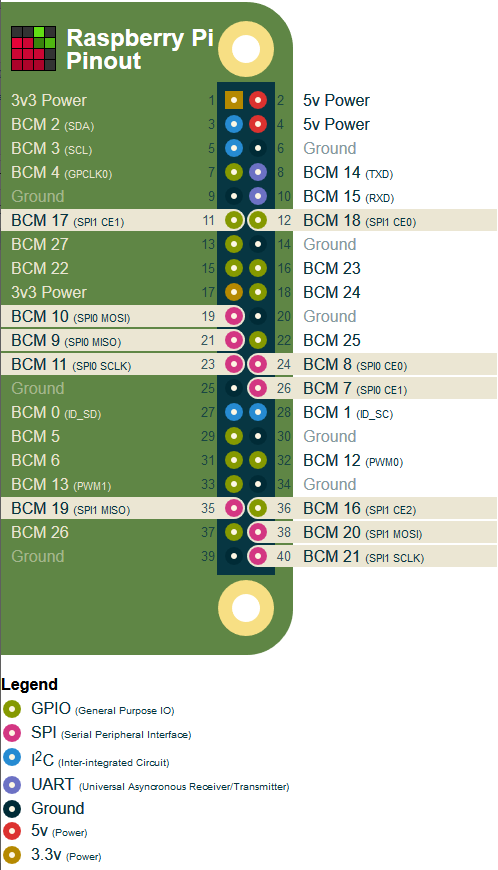
| ST7789 | Pi | PinOut | Description |
|---|---|---|---|
| VCC | 3V3 | 17 | 3V3 |
| GND | GND | 6 | Ground |
| DIN | BCM 10 | 19 | SPI0 MOSI |
| SCK | BCM 11 | 23 | SPI0 SCLK |
| CS | BCM 7 | 26 | SPI0 CE1 |
| DC | BCM 9 | 21 | SPI0 MISO |
| RES | BCM 19 | 35 | SPI1 MISO ? |
| BL | BCM 27 | 13 | GPIO 2 |
Sample Code
update pi
sudo apt-get update
sudo apt-get install python-rpi.gpio python-spidev python-pip python-pil python-numpy
install python package
sudo pip install st7789
execute using python 2 sample in example folder
python scrolling-text.py