You cannot select more than 25 topics
Topics must start with a letter or number, can include dashes ('-') and can be up to 35 characters long.
1.8 KiB
1.8 KiB
git Quick Start Guide
Git Fundamental
-
Git is a distributed version control system. It was designed with the following goals
- Speed
- Simple design
- Strong support for non linear development
- Fully distributed
- Able to handle large projects
-
Git has three main states that your files can reside in: modified, staged, and committed
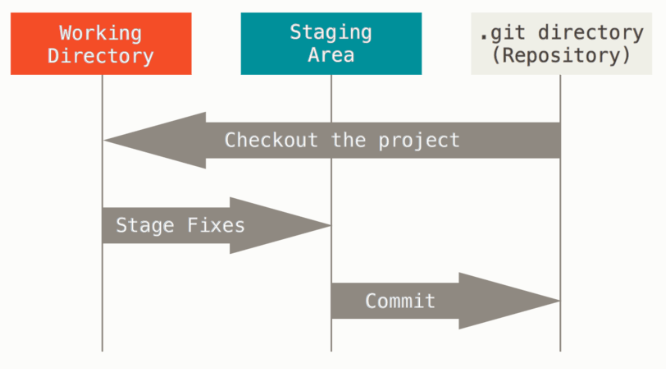
Create a local repo
# Create a bare repo
$ mkdir repo01
$ cd repo01
$ git init

# add remote address
# http
$ git remote add http://dev.mitech.com.sg:3000/mydemo.git
# ssh
$ git remote add ssh://git@dev.mitech.com.sg:222/mydemof.git

# show all remote list
$ git remote
$ git remote -v  # verbose list

# create some files
# add files to staging
$ git add .

# commit to local
$ git commit -m "Initial Commit"

# push to remote server
$ git push origin
Pull remote files
# sync local repo with remote repo changes
$ git pull origin

# list all the branch
$ git branch
main
another_branch

# checkout the main branch
$ git checkout main

# create & checkout a new branch
$ git checkout -b <new_branch>
Fetch remote files
# download all remote files
$ git fetch origin
Git merge flow

Merging
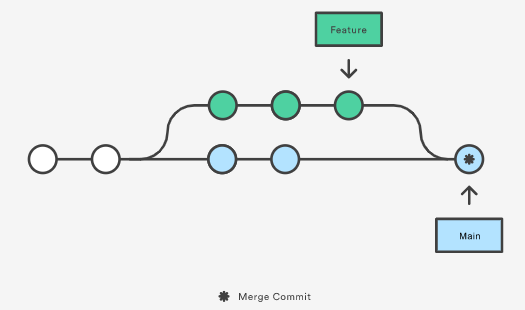
# Merge feature01 into main
$ git checkout main
$ git merge feature01
rebase
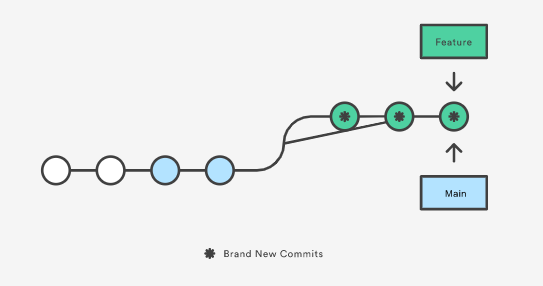
# rebase feature02 onto main
$ git checkout feature02
$ git rebase -i main
cherry pick
# cherry-pick selected commit and merge to main branch
$ git checkout main
$ git cherry-pick <commit-sha>